
Create a Working Map using Google Maps API

Click Here to visit Zonix’s Website

Create a Working Map using Google Maps API


  1. To include a Google map on an online site, you’ll need an API key which is tied to your site URL and your GMail account. First, visit http://www.google.com/apis/maps/signup.html. Make sure to read through the terms of use — there are some uses of the Maps API which are not allowed that you should be aware of.


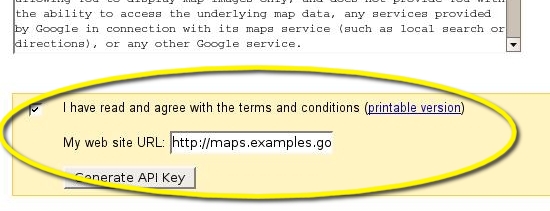
  2. Enter the URL of your website in the ‘My web site URL’ box.It should be a domain name like http://gtl-466/GoogleMapIntegration. Check the box indicating you agree with the terms, then press the ‘Generate API Key’ button.


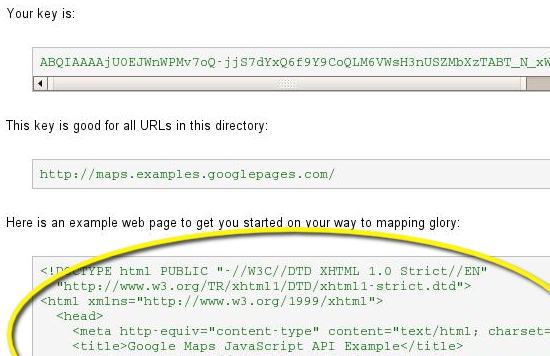
  1. You should now see the sign-up thank you page, which tells you your key (a long string of random characters), the directory/domain it’s valid for, and sample code for your first map which includes your API key. You can see the API key appended to the end of the script tag that loads the Maps API into the page. Keep this page open in your browser.


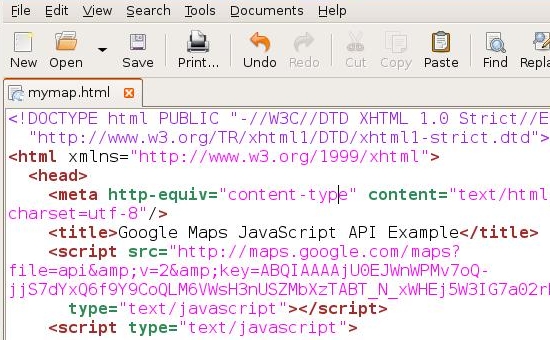
  1. Open a text editor like Notepad on Windows or TextEdit on Macs. Copy and paste the HTML from the thank you page into a blank document, and save it as mymap.html.


  1. It’s time to test it out! Right click on ‘mymap.html’ and select view in browser .Now you’ll see a browser window open up to http://gtl-466/GoogleMapIntegration/mymap.html.If you did all the steps correctly, you should now see a map centered on Palo Alto, California


    If you’re getting an error about the key being registered for a different site, then you probably entered in the wrong URL when you signed up for the API key. Go back to Step 2 of this section and make sure you enter the domain name that you see in the browser window for the page.


    If you’re not seeing a map and are just seeing a blank page, you probably made a copy & paste error. Go back to Step 4, and make sure you copy and paste all and only the HTML given to you in the textbox.


Bookmark and Share


Bookmark and Share

How to add flash files to asp.net web pages

Click Here to visit Zonix’s Website

<object classid=”clsid:D27CDB6E-AE6D-11cf-96B8-444553540000″ codebase=”http://download.macromedia.com/pub/shockwave/cabs/flash/swflash.cab#version=5,0,0,0” width=”540″ height=”400″ hspace=”10″ id=”ShockwaveFlash1VIEWASTEXT”>

<param name=movie value=”Flash File Path”>
<PARAM NAME=”quality” VALUE=”high”>
<PARAM NAME=”bgcolor” VALUE=”#FFFFFF”>
<param name = “wmode” value = “transparent”/>

<embed src=”Flash File Path” width=”540″ height=”400″ loop=”false” quality=high pluginspage=”http://www.macromedia.com/shockwave/download/index.cgi?P1_Prod_Version=ShockwaveFlash” type=”application/x-shockwave-flash”>
</embed>

</object>

Remember to place the Flash File inside the Project only.and give a relative path for the file.

You can also display a Flash file in <iframe>.

Eg:

<

iframe src=”Flash File Path height=”146px” width=”575px”></iframe>


Bookmark and Share

The Google File System – Google’s core storage platform

Google File System – large distributed log structured file system in which they throw in a lot of data. Reliable scalable storage is a core need of any application. GFS is Google’s core storage platform.Google File System (GFS) is a proprietary distributed file system developed by Google for its own use. Its point is both to assure reliablity by using redundant copies and to allow individual most used data to selectively receive more resources (more dedicated hardware or/and redundant copies).GFS is optimized for Google’s core data storage needs, web searching, which can generate enormous amounts of data that needs to be retained; Google File System grew out of an earlier Google effort, “BigFiles”, developed by Larry Page and Sergey Brin in the early days of Google, while it was still located in Stanford. The data is stored persistently, in very large, multiple gigabyte-sized files (around 100GB) which are only extremely rarely deleted, overwritten, or shrunk; files are usually appended to or read. It is also designed and optimized to run on Google’s computing clusters, the nodes of which consist of cheap, “commodity” computers, which means precautions must be taken against the high failure rate of individual nodes and the subsequent data loss. Other design decisions select for high data throughputs, even when it comes at the cost of latency.

read more…


Bookmark and Share

About Zonix Software Solutions

E-Commerce solution does not only involves the development of online products & services selling portal, It also asks for growth in businesses. An E-Commerce portal is incomplete unless it has the Search Engine optimization features.
Zonixsoft is a Software Outsourcing & Offshore Software Development Company specializing in the E-business solutions. Our vast experience in E-Commerce domain helps us understand the exact requirements of customers and let us develop the application which really provides solutions to their problems.


Bookmark and Share